Data security has become more complicated as businesses move their applications to cloud platforms, adopt artificial intelligence (AI), and share information across digital systems. Companies routinely handle sensitive information such as customer records, financial transactions, medical histories, and confidential business documents. Protecting this information is essential, but traditional security methods do not cover every stage of data processing.
Encryption protects information while it is stored and while it travels between systems. However, applications often need to work with data in a usable form to perform calculations, analyze records, or generate results. This creates a potential security gap.
Confidential computing addresses this challenge by helping protect data while it is actively being processed. It uses hardware-based security technologies to isolate sensitive workloads and reduce the risk of unauthorized access.
As cloud computing and AI continue to evolve, confidential computing is becoming an important part of modern cybersecurity strategies.
What Is Confidential Computing?
Confidential computing is a security approach designed to protect sensitive information while a computer processes it. It relies on specialized hardware capabilities to create protected environments in which applications can work with data without exposing it unnecessarily to the surrounding system.
These protected environments are commonly known as Trusted Execution Environments (TEEs). They help isolate applications, their code, and the data they process from other software and certain privileged users or system components.
For example, imagine a healthcare organization using a cloud platform to analyze patient records. The organization needs computing resources to process the information, but it also wants to reduce the possibility that unauthorized parties could inspect sensitive records during analysis.
Confidential computing can help create a protected processing environment for that workload, subject to the platform’s security design and configuration.
The goal is not simply to secure stored files. It is to extend protection into the stage when information is actively being used.
Why Is Protecting Data in Use Important?
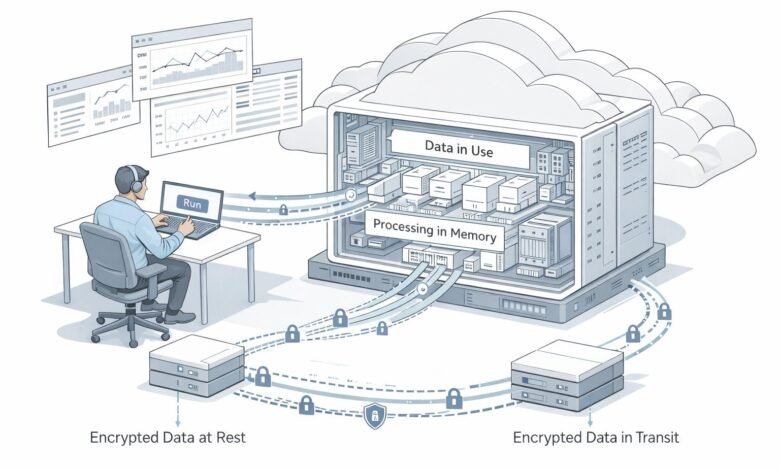
Modern security strategies generally focus on three states of data: data at rest, data in transit, and data in use.
Data at rest includes information stored in databases, hard drives, and cloud storage. Data in transit refers to information moving between devices, applications, or networks. Data in use is information being processed by a program, such as when an application analyzes a database or an AI model evaluates a request.
Encryption is widely used to protect stored and transmitted information. However, conventional processing often requires data to be available in memory in a form that the application can use.
This creates a potential exposure point if an attacker compromises the operating system, exploits a software vulnerability, or gains inappropriate access to the computing environment.
Confidential computing helps reduce this risk by placing sensitive workloads inside hardware-protected environments. It does not eliminate every security threat, but it adds another layer of protection where traditional encryption alone may not be sufficient.
How Does Confidential Computing Work?
Confidential computing combines hardware-based isolation, encryption, and mechanisms for verifying the integrity of a computing environment.
1. Creating a Protected Environment
The system establishes a Trusted Execution Environment using supported processor or platform security features. This environment is designed to isolate a workload from other software running on the same infrastructure.
2. Loading Sensitive Data
The application brings the required information into the protected environment. Depending on the implementation, the platform can help protect data in memory and restrict access from components outside the trusted boundary.
3. Processing Information Securely
The application performs its intended tasks inside the protected environment. It might analyze customer transactions, evaluate medical data, or run an AI inference request.
The security design aims to prevent unauthorized inspection or modification of the protected workload by components outside that environment.
4. Verifying the Environment
Some confidential computing systems support a process called remote attestation. This allows an authorized party to evaluate cryptographic evidence about the platform and workload before releasing sensitive data or encryption keys.
Attestation can help an organization determine whether a system meets its security requirements. The exact guarantees depend on the hardware, software, configuration, and verification policy.
5. Returning the Results
After processing, the application returns its results to an authorized destination. Organizations must still protect these outputs, control access, and manage encryption keys appropriately.
Together, these mechanisms help establish a stronger security boundary for sensitive computing tasks.
Key Technologies Behind Confidential Computing
Several technologies contribute to confidential computing, with different implementations offering different levels of protection.
Trusted Execution Environments
Trusted Execution Environments provide isolated areas for executing sensitive code and processing information. Hardware-enforced isolation helps reduce exposure to certain attacks involving privileged software or other workloads.
Memory Encryption
Memory encryption helps protect information held in system memory against specific forms of unauthorized physical or privileged access. Its effectiveness depends on the platform design and the threats being addressed.
Remote Attestation
Remote attestation provides evidence that a computing environment meets defined integrity requirements. Organizations can use this evidence to decide whether a workload should receive access to sensitive information.
Confidential Virtual Machines
Confidential virtual machines use hardware security features to protect virtual machine workloads. They are particularly useful in cloud environments where organizations want additional safeguards against access from outside the protected virtual machine boundary.
Secure Key Management
Encryption keys are central to confidential computing. Secure key management helps ensure that sensitive workloads receive access to keys only when the required identity and security conditions have been satisfied.
These technologies work together with conventional cybersecurity controls rather than replacing them.
Real-World Applications of Confidential Computing
Confidential computing can support a wide range of industries that need to process sensitive information without unnecessarily exposing it.
Healthcare and Medical Research
Hospitals, laboratories, and research organizations handle highly sensitive patient information. Confidential computing can help protect medical datasets while supporting research, statistical analysis, and AI-assisted applications.
For example, authorized researchers may be able to analyze sensitive records within a protected environment while limiting access to the underlying information.
Banking and Financial Services
Banks and financial institutions process transaction records, customer details, and fraud-related data. Confidential computing can help protect these workloads during analysis and support secure collaboration between organizations.
It may also help financial institutions run risk models on sensitive datasets while strengthening isolation from the surrounding infrastructure.
Artificial Intelligence and Machine Learning
AI systems often process proprietary datasets, private user information, and valuable model assets. Confidential computing can help protect data during AI inference and, on supported platforms, model training.
This is particularly relevant when organizations want to use cloud-based AI services without relying solely on conventional infrastructure security controls.
Cloud Computing
Cloud environments allow businesses to scale applications without maintaining all their own hardware. However, organizations may have concerns about who can access workloads within shared infrastructure.
Confidential computing can help strengthen workload isolation and provide attestation capabilities, allowing organizations to apply additional security requirements before processing sensitive data in the cloud.
Government and Public Services
Government agencies manage citizen records, confidential documents, and other sensitive information. Confidential computing can support workloads that require stronger confidentiality protections, including secure data analysis and selected cross-agency collaboration projects.
Actual deployments must still satisfy applicable legal, operational, and data governance requirements.
Benefits of Confidential Computing
Confidential computing offers several potential advantages for organizations handling sensitive data.
Stronger data confidentiality: Hardware-based isolation helps reduce the risk of unauthorized access to information during processing.
Improved cloud security: Organizations can add protections beyond conventional access controls and storage encryption when running sensitive workloads on supported cloud platforms.
More secure collaboration: Multiple parties may be able to perform approved analyses on sensitive information while limiting direct access to one another’s raw datasets.
Support for privacy-focused AI: Confidential computing can help organizations process private data in protected environments, supporting certain AI applications that would otherwise raise confidentiality concerns.
Greater visibility into platform trust: Attestation provides evidence that can help organizations verify whether a computing environment meets defined security requirements.
Support for regulated workloads: When properly implemented, confidential computing can contribute to a broader security and compliance strategy for industries that process sensitive information.
These benefits depend on choosing an appropriate platform and configuring it according to the organization’s actual security needs.
Challenges and Limitations to Consider
Although confidential computing offers valuable protections, it is not a complete cybersecurity solution.
Performance Considerations
Hardware-based protection, encryption, and attestation can introduce additional processing or operational overhead. The impact varies by workload and platform, so organizations should evaluate performance before large-scale deployment.
Application Compatibility
Some applications may require architectural changes or additional configuration to operate effectively inside protected environments. Teams should check whether their software, libraries, and dependencies are supported.
Hardware and Platform Dependencies
Confidential computing depends on specific hardware features and software implementations. Security capabilities can differ between processors, cloud providers, and deployment models.
Key Management Complexity
Poorly managed encryption keys can undermine the overall security design. Organizations need clear policies for key storage, access, rotation, revocation, and recovery.
Remaining Security Risks
Confidential computing does not automatically eliminate software vulnerabilities, compromised applications, malicious authorized users, insecure outputs, or every side-channel attack. Organizations still need patch management, monitoring, identity controls, secure development, and incident response procedures.
Understanding these limitations helps businesses make realistic decisions about where confidential computing fits into their existing security architecture.
Confidential Computing and the Future of Cybersecurity
The growing use of AI and cloud infrastructure is increasing interest in protecting data throughout its entire lifecycle. Organizations want to benefit from advanced computing capabilities without unnecessarily exposing sensitive information to infrastructure they do not fully control.
In 2026, developments in confidential AI, protected accelerator workloads, and stronger attestation mechanisms are expanding the range of workloads that can use these technologies. The National Institute of Standards and Technology (NIST) published a draft report in May 2026 examining hardware-enabled confidential computing for cloud workloads, including AI-related data protection.
These developments indicate that confidential computing is moving beyond a specialized infrastructure feature toward a broader component of data protection strategies.
In the coming years, organizations may increasingly combine confidential computing with zero-trust security, privacy-enhancing technologies, data governance, and AI security controls. The objective will be to establish clearer, verifiable boundaries around sensitive workloads while maintaining the flexibility of modern computing environments.
However, adoption will require continued attention to interoperability, performance, implementation quality, and the limitations of hardware-based security.
Conclusion
Confidential computing addresses an important gap in digital security: protecting information while it is actively being processed. By using Trusted Execution Environments, memory protection, and attestation, it can help organizations reduce the exposure of sensitive workloads across cloud computing, healthcare, financial services, and artificial intelligence.
It should not be treated as a replacement for encryption, identity management, or conventional cybersecurity practices. Instead, it adds another layer of defense to a broader security strategy.
As businesses handle increasingly sensitive data and adopt more advanced AI applications, understanding confidential computing will help technology teams make better-informed decisions about privacy, infrastructure security, and responsible data use.
Frequently Asked Questions
1. What is confidential computing?
Confidential computing protects sensitive data while it is being processed by using hardware-based security features and isolated computing environments.
2. How does confidential computing work?
It uses Trusted Execution Environments (TEEs) to isolate sensitive applications and data from other parts of a computer system, helping reduce unauthorized access.
3. What are the main benefits of confidential computing?
Its benefits include improved data confidentiality, stronger cloud workload isolation, support for privacy-focused AI, and additional safeguards when processing sensitive information.
4. Is confidential computing completely secure?
No. It helps reduce specific security risks, but organizations still need encryption, access controls, software updates, secure key management, and continuous monitoring.