Artificial Intelligence (AI) is no longer an emerging technology – it has become the foundation of modern innovation. From healthcare and cybersecurity to finance, manufacturing, education, and transportation, AI is transforming how organizations operate, make decisions, and deliver value. As we move through 2026, AI continues to evolve with advanced reasoning models, autonomous AI agents, edge AI, and multimodal systems that are reshaping industries worldwide.
In this updated guide, we’ll explore why AI is essential for the future of technology, the latest trends driving adoption, real-world applications, benefits, challenges, and what businesses should expect in the years ahead.
What Is Artificial Intelligence?
Artificial Intelligence (AI) refers to computer systems designed to perform tasks that typically require human intelligence. These include:
- Learning from data
- Recognizing images and speech
- Understanding natural language
- Solving complex problems
- Predicting outcomes
- Automating repetitive tasks
- Making intelligent decisions
Unlike traditional software that follows fixed rules, modern AI systems continuously improve using machine learning, deep learning, reinforcement learning, and generative AI models.
Why AI Is Essential for the Future of Technology
Technology is becoming more data-driven than ever before. Every second, organizations generate enormous amounts of information from websites, mobile apps, IoT devices, cloud platforms, and connected systems. AI enables businesses to process this data efficiently and transform it into actionable insights.
Key reasons AI is becoming essential include:
- Increasing business automation
- Faster decision-making
- Improved customer experiences
- Enhanced cybersecurity
- Smarter software development
- Greater operational efficiency
- Personalized digital services
- Accelerated scientific research
Without AI, many modern technologies would struggle to handle the scale and complexity of today’s digital environment.
Latest AI Trends Shaping Technology in 2026
1. AI Agents and Autonomous Workflows
AI agents can independently plan, execute, and complete complex business tasks. Organizations are integrating AI agents into customer service, software development, finance, HR, and operations to improve productivity.
2. Multimodal Artificial Intelligence
Modern AI systems now understand multiple types of information simultaneously, including:
- Text
- Images
- Audio
- Video
- Documents
- Code
This enables richer user experiences and more accurate decision-making.
3. Edge AI
Instead of sending data to cloud servers, Edge AI processes information directly on devices such as:
- Smartphones
- Industrial sensors
- Medical equipment
- Autonomous vehicles
- Smart cameras
Benefits include:
- Lower latency
- Better privacy
- Reduced bandwidth costs
- Faster real-time responses
4. AI-Powered Cybersecurity
Cyber threats continue to evolve rapidly. AI is becoming a critical defense mechanism by helping organizations:
- Detect malware
- Identify phishing attacks
- Monitor suspicious network activity
- Analyze user behavior
- Prevent ransomware
- Automate threat response
AI significantly reduces incident response time and strengthens security operations.
5. Responsible and Explainable AI
As AI adoption grows, organizations are prioritizing:
- Ethical AI development
- Transparent decision-making
- Bias reduction
- Data privacy
- Regulatory compliance
- AI governance frameworks
Responsible AI helps build trust while ensuring compliance with global regulations.
Real-World Applications of AI
Healthcare
AI improves healthcare by supporting:
- Medical image analysis
- Disease prediction
- Personalized treatment plans
- Drug discovery
- Virtual health assistants
- Remote patient monitoring
Healthcare providers use AI to improve patient outcomes while reducing operational costs.
Finance
Financial institutions leverage AI for:
- Fraud detection
- Credit risk analysis
- Algorithmic trading
- Customer support chatbots
- Expense forecasting
- Investment recommendations
AI helps improve accuracy and minimize financial risks.
Manufacturing
Smart factories use AI for:
- Predictive maintenance
- Quality inspection
- Robotics automation
- Supply chain optimization
- Production forecasting
This results in increased efficiency and lower operational costs.
Education
Educational institutions utilize AI for:
- Personalized learning
- Intelligent tutoring systems
- Automated grading
- Student performance analytics
- Language translation
- Accessibility improvements
AI enables more engaging and adaptive learning experiences.
Retail and E-commerce
Retail businesses use AI to provide:
- Product recommendations
- Dynamic pricing
- Customer segmentation
- Demand forecasting
- Inventory management
- Personalized marketing campaigns
These capabilities improve customer satisfaction and increase sales.
Software Development
AI is transforming software engineering through:
- AI coding assistants
- Automated testing
- Bug detection
- Code optimization
- Documentation generation
- DevOps automation
Developers can build applications faster while maintaining higher code quality.
Benefits of AI for Businesses
Organizations investing in AI experience numerous advantages:
Improved Productivity
AI automates repetitive tasks, allowing employees to focus on strategic work.
Better Decision-Making
AI analyzes massive datasets faster than traditional analytics tools.
Cost Reduction
Automation lowers operational expenses and minimizes manual errors.
Enhanced Customer Experience
AI delivers personalized recommendations and intelligent customer support.
Increased Innovation
AI accelerates research, product development, and digital transformation initiatives.
Competitive Advantage
Businesses adopting AI earlier often gain stronger market positioning and improved operational efficiency.
Challenges of AI Adoption
Despite its benefits, AI implementation comes with several challenges.
Data Privacy
Organizations must protect sensitive customer information while complying with evolving privacy regulations.
Bias in AI Models
Poor-quality or unbalanced datasets may produce biased outcomes, making fairness testing essential.
Cybersecurity Risks
AI systems themselves can become targets for adversarial attacks, model theft, and data poisoning.
Skill Gaps
Demand for AI professionals continues to exceed supply, creating talent shortages in many industries.
High Implementation Costs
Building enterprise-grade AI infrastructure requires investment in cloud computing, skilled personnel, and governance frameworks.
How Businesses Can Prepare for an AI-Driven Future
Organizations should take a strategic approach to AI adoption by:
- Developing an AI roadmap aligned with business goals
- Investing in employee AI training and upskilling
- Prioritizing high-quality data management
- Implementing AI governance policies
- Strengthening cybersecurity defenses
- Monitoring AI performance and compliance
- Starting with pilot projects before scaling enterprise-wide
The Future of AI Beyond 2026
Artificial Intelligence will continue to evolve with innovations such as:
- Autonomous AI assistants
- AI-powered robotics
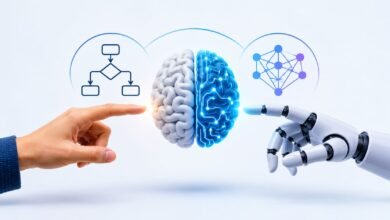
- Human-AI collaboration
- Scientific research acceleration
- Smart cities
- Personalized healthcare
- Quantum AI integration
- Sustainable AI computing
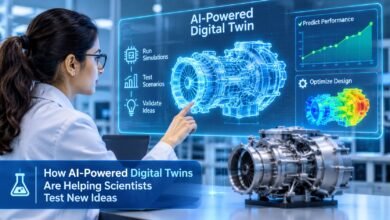
- Intelligent digital twins
- AI-native enterprise software
Organizations that embrace these advancements responsibly will be better positioned for long-term growth and innovation.
Conclusion
Artificial Intelligence has become one of the most influential technologies of the digital age. Its ability to automate tasks, analyze vast amounts of data, enhance cybersecurity, accelerate innovation, and improve customer experiences makes it indispensable for businesses and governments alike.
As AI technologies continue to mature, success will depend not only on adopting advanced tools but also on implementing them responsibly, securely, and ethically. Companies that invest in AI today will be better equipped to navigate the rapidly evolving technological landscape and remain competitive in the future.
Frequently Asked Questions (FAQs)
1. Why is AI important for the future of technology?
AI enables automation, intelligent decision-making, predictive analytics, and innovation across industries, making technology more efficient, scalable, and user-centric.
2. Which industries benefit the most from AI?
Healthcare, finance, manufacturing, retail, education, transportation, cybersecurity, and software development are among the industries experiencing the greatest benefits from AI adoption.
3. What are the biggest challenges of AI implementation?
Common challenges include data privacy concerns, AI bias, cybersecurity risks, high implementation costs, and the shortage of skilled AI professionals.
4. How can businesses prepare for AI adoption?
Businesses should build a clear AI strategy, improve data quality, train employees, establish AI governance, strengthen cybersecurity, and start with pilot projects before expanding AI initiatives.