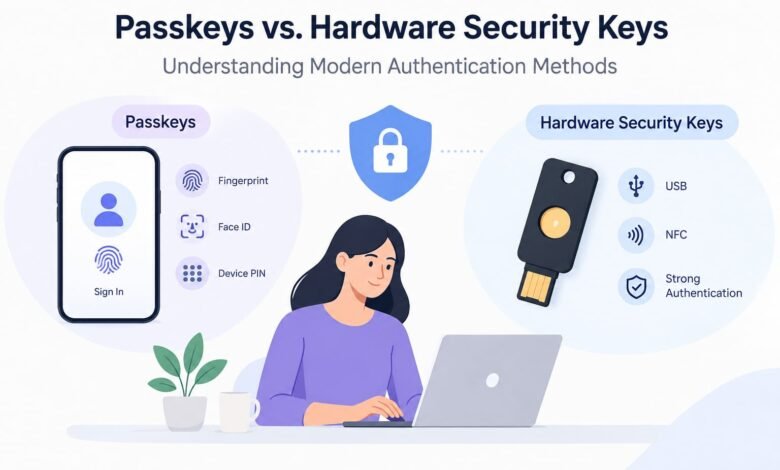
Passkeys vs. Hardware Security Keys: Understanding Modern Authentication Methods

Passwords have been part of our digital lives for decades. We use them to access email accounts, social media, business platforms, banking services, and countless other online tools. However, passwords can be stolen, guessed, reused, or exposed through data breaches. As cyber threats become more sophisticated, relying on passwords alone is no longer the safest approach to protecting digital accounts.
Modern authentication methods are changing how people sign in to their accounts. Two important options are passkeys and hardware security keys. Both are designed to strengthen account security and reduce the risks associated with traditional passwords, but they work in different ways.
Passkeys offer a convenient way to sign in using a fingerprint, facial recognition, a device PIN, or another supported method. Hardware security keys, on the other hand, are physical devices that users connect to a computer or mobile device to verify their identity.
Although these technologies share a common goal, they are not exactly the same. Understanding their differences can help individuals, businesses, and IT professionals choose an authentication method that matches their security requirements.
What Are Passkeys?
Passkeys are a passwordless authentication method that allows users to sign in without entering a traditional password. They rely on cryptographic technology to verify that someone attempting to access an account has the appropriate credential.
When a passkey is created, a pair of cryptographic keys is generated. The public key is stored by the online service, while the private key remains protected by the user’s device or credential manager. During login, the service sends a challenge that the device signs using the private key. The service then verifies the response using the corresponding public key.
This process helps prevent attackers from signing in simply by obtaining a password.
Users typically unlock a passkey using a fingerprint, facial recognition, a device PIN, or another supported screen-lock method. The biometric information generally stays on the user’s device rather than being sent to the website.
How Passkeys Work
The process is designed to make secure login straightforward.
- A user creates a passkey for a supported website or application.
- The passkey is saved on a compatible device or in a supported credential manager.
- When the user returns, the website requests authentication.
- The user selects the passkey and verifies their identity using an available unlock method.
- The device completes the cryptographic authentication process, allowing access if verification succeeds.
Depending on the platform, passkeys may synchronize across a user’s devices through a supported credential manager or remain tied to a particular device.
Benefits of Passkeys
1. Protection against phishing
Passkeys are associated with the website or service for which they were created. This makes them resistant to many phishing attacks that trick users into entering passwords on fake login pages.
2. Convenient sign-in
Users do not need to remember complex passwords or repeatedly type them into login forms. Authentication can often be completed with a fingerprint, face scan, or device PIN.
3. Reduced password-related risks
Because passkey authentication does not depend on a traditional password, it reduces risks linked to password reuse, credential stuffing, and stolen login credentials.
4. Support for multiple devices
Some passkeys can be synchronized through compatible credential managers, allowing users to access their accounts from supported devices without creating a separate passkey each time.
Limitations of Passkeys
Passkeys still have practical considerations. Users may need an account recovery method if they lose access to their devices or credential manager. Compatibility can also vary between websites, operating systems, browsers, and authentication platforms.
For businesses, managing passkeys across different devices and employee accounts requires suitable policies and recovery procedures.
What Are Hardware Security Keys?
Hardware security keys are physical authentication devices used to verify a user’s identity when signing in to an online account. They commonly support standards such as FIDO2 and WebAuthn, which enable strong, phishing-resistant authentication.
These keys may connect through USB-A or USB-C, communicate through NFC, or use other supported connection methods. Some models offer more than one connection option, making them compatible with a wider range of devices.
To sign in, users usually insert the key into a device or tap it against a compatible phone. Depending on the key and service, they may also need to touch a sensor or enter a PIN.
Unlike a password that can be copied and entered elsewhere, a properly implemented hardware security key performs cryptographic operations to prove possession of the credential.
How Hardware Security Keys Work
The authentication process typically follows these steps:
- The user registers the security key with a supported website or application.
- The service associates a cryptographic credential with the user’s account.
- During login, the service sends an authentication challenge.
- The user connects or taps the security key and completes any required verification.
- The key generates a cryptographic response, which the service checks before granting access.
The private credential is protected by the security key, depending on the key’s design and supported authentication standard.
Benefits of Hardware Security Keys
1. Strong phishing resistance
Compatible FIDO2 security keys verify the website’s identity as part of authentication. This makes them difficult to use successfully on fraudulent websites impersonating legitimate services.
2. Physical control over authentication
The user must possess the registered key to authenticate with it. This adds a tangible security factor, particularly when the key is required by an organization’s login policy.
3. Useful for high-risk accounts
Security keys can be valuable for administrators, cybersecurity teams, business executives, and employees with access to sensitive systems.
4. Reduced reliance on mobile devices
A hardware key can provide an authentication option without requiring a smartphone for every login, provided the user’s computer or mobile device supports the key’s connection method.
Limitations of Hardware Security Keys
A hardware key can be lost, damaged, or left behind. Users may also encounter compatibility issues if a device lacks the necessary port or wireless support.
Organizations must plan for spare keys, secure registration, lost-key procedures, and account recovery. Buying a physical key alone does not guarantee protection if an account’s recovery process remains vulnerable.
Passkeys vs. Hardware Security Keys: Key Differences
Although both methods can use public-key cryptography and provide strong protection against phishing, their main differences involve how credentials are stored, how users access them, and how authentication is managed.
| Feature | Passkeys | Hardware Security Keys |
|---|---|---|
| Main form | Digital credential | Physical authentication device |
| Typical login | Fingerprint, face recognition, PIN, or supported device verification | Connect or tap the key, with additional verification when required |
| Credential storage | Device or supported credential manager | Protected within the security key, depending on its design |
| Phishing resistance | Strong when implemented using standard passkey protocols | Strong when using compatible FIDO2/WebAuthn authentication |
| Portability | May synchronize across supported devices | Requires carrying the registered physical key |
| Device dependency | Depends on credential storage and recovery options | Depends on key compatibility and availability |
| Common use | Everyday personal and business accounts | Sensitive accounts and organizations requiring physical authentication |
| Main concern | Device access, synchronization, and recovery | Loss, damage, compatibility, and backup keys |
One important distinction is that passkeys and hardware security keys are not mutually exclusive categories. Some hardware security keys can store passkeys. Therefore, a passkey describes an authentication credential, while a hardware security key describes a physical device that can hold or use certain types of credentials.
Which Is More Secure: Passkeys or Hardware Security Keys?
There is no universal winner because security depends on the implementation, the account’s configuration, and the user’s threat model.
Both properly implemented passkeys and compatible hardware security keys can provide phishing-resistant authentication. They use cryptographic verification rather than relying on a password that a user might accidentally disclose.
For everyday users, passkeys can provide a strong balance of security and convenience. They reduce the need to remember passwords and make fraudulent login pages less effective.
Hardware security keys can be especially useful when an organization wants employees to authenticate with a physical device. They may also be appropriate for people protecting highly privileged accounts or following strict security policies.
However, neither method eliminates every risk. Malware, compromised devices, insecure account recovery, social engineering, and weaknesses in the service itself can still create security problems.
The best choice is the method that offers strong authentication while fitting the user’s devices, recovery requirements, and security policies.
When Should You Use Passkeys?
Passkeys are a practical option for users who want to improve account security without adding extra steps to everyday login.
They are particularly useful for:
- Personal email and social media accounts.
- Online shopping and digital services that support passkeys.
- Employees who frequently switch between compatible devices.
- Users who struggle to manage multiple strong passwords.
- Businesses looking to introduce passwordless authentication at scale.
Before adopting passkeys, users should check which credential manager or device will store them and understand how to recover access if that device becomes unavailable.
When Should You Use Hardware Security Keys?
Hardware security keys are worth considering when physical control over authentication is an important requirement.
They can be suitable for:
- IT administrators with access to critical systems.
- Cybersecurity professionals managing privileged accounts.
- Businesses protecting sensitive corporate information.
- Organizations seeking phishing-resistant authentication policies.
- Users who prefer a separate physical device for signing in.
For important accounts, registering a backup security key can reduce the chance of being locked out if the primary key is lost or damaged. Backup keys should be stored securely and managed according to the organization’s policies.
Can You Use Passkeys and Hardware Security Keys Together?
Yes. In many environments, these methods can complement each other.
A business might allow employees to use synchronized passkeys for routine access while requiring hardware security keys for administrators or accounts with elevated privileges. Another organization might permit both methods as approved sign-in options, depending on its security requirements.
The key is to establish clear authentication and recovery policies. Organizations should decide which accounts need stronger controls, how credentials are registered, who can approve replacements, and what happens when an employee loses a device or security key.
A layered approach can improve security without making every login unnecessarily complicated.
Best Practices for Modern Authentication
Regardless of which method you choose, a few practical steps can help protect your accounts.
Choose phishing-resistant authentication. Prefer passkeys or compatible FIDO2 security keys over password-only login when a service supports them.
Secure account recovery. Review recovery email addresses, phone numbers, backup codes, and alternative authentication methods. A weak recovery process can undermine strong login protection.
Keep devices updated. Install security updates for operating systems, browsers, and credential management applications.
Register a backup method. Where appropriate, maintain a securely stored backup key or another recovery option supported by the service.
Apply stronger controls to privileged accounts. Administrators and employees handling sensitive information may need stricter authentication policies than ordinary users.
Educate employees. Explain how authentication works, how to report suspicious login requests, and what to do if a device or security key goes missing.
Conclusion
Passkeys and hardware security keys represent important steps toward safer digital authentication. Both can reduce the risks associated with traditional passwords and help protect users against phishing and credential theft.
Passkeys are often a convenient choice for everyday accounts because they can make signing in faster while maintaining strong security. Hardware security keys provide a physical authentication option that can be particularly valuable for privileged accounts and organizations with strict security requirements.
Rather than treating one method as the perfect solution for every situation, users and businesses should evaluate their security needs, device compatibility, and account recovery procedures.
As passwordless authentication becomes more widely adopted, understanding these technologies will help individuals and organizations make better decisions about protecting their digital identities.
Frequently Asked Questions
1. Are passkeys more secure than passwords?
Yes, passkeys generally provide stronger protection against phishing and password theft by using cryptographic authentication instead of reusable passwords.
2. What is the main difference between passkeys and hardware security keys?
Passkeys are digital authentication credentials stored on a device or supported credential manager. Hardware security keys are physical devices that can authenticate users and may also store passkeys.
3. Can hardware security keys prevent phishing attacks?
Compatible FIDO2 hardware security keys provide strong phishing resistance by verifying the website associated with the authentication request.
4. What happens if I lose my hardware security key?
If you lose your security key, you may need a registered backup key or the account’s recovery process to regain access. Keeping a secure backup method is recommended.