Green biotechnology is emerging as a powerful approach to solving some of the world’s most pressing environmental and resource challenges. By applying biological science, biotechnology, and genetic engineering to agriculture, manufacturing, energy, and environmental management, researchers are developing solutions that can reduce waste, conserve resources, and lower the environmental impact of economic activity.
Unlike conventional industrial approaches that often depend heavily on fossil fuels, intensive chemical inputs, or energy-intensive processes, green biotech focuses on using biological systems more efficiently. From microorganisms that break down pollutants to crops designed for improved resource efficiency, biotechnology can contribute to a more sustainable future.
As climate change, biodiversity loss, water scarcity, and resource consumption continue to create global challenges, green biotechnology is moving from an emerging research field toward practical applications across multiple industries.
What Is Green Biotechnology?
Green biotechnology refers to the use of biotechnology for applications that support environmental sustainability, particularly in agriculture and resource management.
It combines areas such as:
- Genetic engineering
- Microbiology
- Synthetic biology
- Plant biotechnology
- Enzyme technology
- Bio-based manufacturing
- Bioremediation
- Precision agriculture
The objective is not simply to replace traditional technology with biological alternatives. Instead, green biotech aims to create processes and products that use fewer resources, generate less pollution, and operate more efficiently.
Why Green Biotechnology Matters
Modern economies face several interconnected environmental problems. Agriculture requires significant amounts of water, fertilizers, and land. Manufacturing generates waste and greenhouse-gas emissions. Plastic pollution continues to affect ecosystems, while contaminated soil and water can be difficult and expensive to restore.
Green biotechnology offers several potential pathways for addressing these issues.
1. More Sustainable Agriculture
Agricultural biotechnology can help develop crops with characteristics such as:
- Improved resistance to pests and diseases
- Better tolerance to drought or salinity
- Improved nutrient-use efficiency
- Enhanced productivity under challenging conditions
- Reduced dependence on certain agricultural inputs
Gene-editing technologies are also enabling researchers to investigate precise changes in plant traits. When combined with responsible agricultural practices, these technologies could help farmers adapt to changing environmental conditions.
2. Biological Alternatives to Chemical Inputs
Microorganisms can be used to develop biofertilizers and biopesticides that complement or, in some applications, reduce reliance on conventional agricultural chemicals.
For example, beneficial microbes can support nutrient availability around plant roots, while naturally occurring biological agents can help manage particular agricultural pests.
This approach can contribute to healthier soil ecosystems and more efficient nutrient management.
3. Bioremediation: Using Biology to Clean Pollution
One of the most promising applications of environmental biotechnology is bioremediation.
Certain microorganisms can metabolize or transform pollutants in contaminated environments. Researchers are studying biological systems for applications involving:
- Petroleum contamination
- Industrial pollutants
- Wastewater
- Heavy-metal contamination
- Agricultural residues
Instead of relying exclusively on physical or chemical treatment, bioremediation can use biological processes to help restore contaminated environments.
Green Biotech and Sustainable Manufacturing
Biotechnology is also changing how certain products can be manufactured.
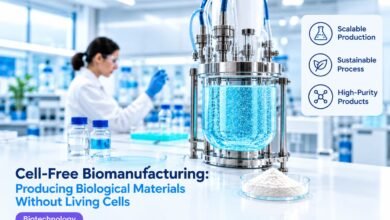
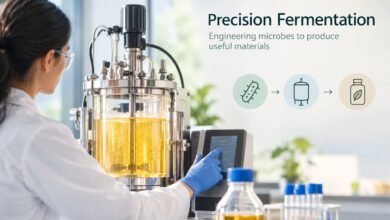
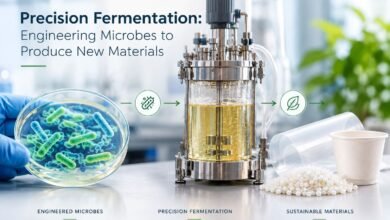
Microorganisms such as bacteria and yeast can act as biological production systems for chemicals, materials, enzymes, and other useful compounds. In some cases, fermentation-based manufacturing can provide alternatives to petroleum-dependent production pathways.
Bio-Based Materials
Researchers are developing materials from biological feedstocks, including:
- Bioplastics
- Bio-based chemicals
- Biomaterials
- Cellulose-derived products
- Microbial polymers
These materials do not automatically eliminate environmental problems. Their sustainability depends on factors such as feedstock sourcing, manufacturing energy, durability, recycling, and end-of-life management.
Therefore, evaluating the entire lifecycle of a bio-based product is essential.
Enzymes: Nature’s Sustainable Catalysts
Enzymes are biological catalysts that can accelerate chemical reactions under relatively mild conditions.
Industrial biotechnology uses enzymes in areas such as:
- Food processing
- Textile manufacturing
- Detergents
- Paper production
- Biofuel production
- Waste treatment
Engineered enzymes can sometimes improve process efficiency while reducing energy consumption or the need for harsh chemicals.
This makes enzyme biotechnology an important component of the broader transition toward more resource-efficient manufacturing.
Green Biotechnology and the Circular Economy
The circular economy focuses on reducing waste by keeping materials and resources in use for as long as possible.
Green biotechnology can support this model by converting biological and organic waste into useful resources.
For example, biological processes can help transform waste streams into:
- Biogas
- Organic fertilizers
- Bio-based chemicals
- Animal-feed ingredients where appropriate
- Industrial enzymes
- Other valuable biomaterials
This creates an opportunity to view waste not simply as something to dispose of, but as a potential input for another production process.
The Role of Synthetic Biology
Synthetic biology is expanding the possibilities of green biotechnology by allowing scientists to design or modify biological systems for specific functions.
Researchers are investigating engineered microorganisms that could potentially:
- Produce sustainable chemicals
- Convert renewable feedstocks into useful materials
- Capture or utilize carbon
- Break down difficult-to-process compounds
- Manufacture biological materials more efficiently
However, engineered biological systems require careful evaluation. Environmental release, containment, ecological interactions, and unintended effects must be considered before deployment.
Green Biotech and Climate Change
Climate change is increasing the need for technologies that can reduce emissions and improve resilience.
Green biotechnology can contribute in several ways, including:
Carbon-Efficient Production
Microbial fermentation and bio-based manufacturing may provide lower-carbon pathways for producing certain chemicals and materials, depending on the energy source and production system.
Climate-Resilient Crops
Plant biotechnology can help researchers investigate traits that enable crops to perform better under environmental stresses such as drought, heat, or salinity.
Biological Carbon Solutions
Researchers are exploring biological approaches for carbon capture, carbon utilization, and improved carbon storage. These technologies remain an active area of research, and their real-world climate benefits depend heavily on scalability and lifecycle performance.
Challenges and Ethical Considerations
Green biotechnology has considerable potential, but it is not a universal solution.
Important challenges include:
Environmental safety: Modified organisms must be assessed for possible ecological impacts.
Biodiversity: Agricultural biotechnology should be developed alongside strategies that protect genetic and ecosystem diversity.
Regulation: Biotechnology products may require rigorous testing and regulatory oversight before commercialization or environmental use.
Resource requirements: A bio-based product is not necessarily sustainable simply because it comes from biological materials.
Public acceptance: Transparent communication and public participation are important when biotechnology affects food, agriculture, or the environment.
Scalability: A technology that works successfully in a laboratory may face significant technical and economic challenges when deployed at industrial scale.
What Does the Future of Green Biotechnology Look Like?
The next phase of green biotechnology is likely to involve greater integration between biotechnology, artificial intelligence, advanced analytics, automation, and sustainable engineering.
AI-assisted biological research can help scientists analyze large datasets, identify promising biological pathways, and optimize experiments. Automation can improve the consistency of laboratory workflows, while advances in genetic engineering can enable more precise biological modifications.
Future developments could include:
- More resource-efficient crops
- Advanced microbial manufacturing
- Biodegradable and recyclable biomaterials
- Improved biological wastewater treatment
- Sustainable industrial enzymes
- Precision fermentation
- New approaches to carbon utilization
- Biological methods for recovering valuable resources from waste
The most successful solutions will likely be those that combine biological innovation with strong environmental assessment and practical lifecycle analysis.
Conclusion
Green biotechnology represents an important part of the global transition toward more sustainable production and resource management. From resilient crops and biological pest management to enzyme-based manufacturing, bioremediation, and engineered microorganisms, biotechnology can help address environmental challenges in innovative ways.
However, sustainable biotechnology requires more than simply creating a biological alternative. Its environmental impact must be evaluated across the entire lifecycle, from raw materials and production to use and disposal.
With responsible research, effective regulation, and continued innovation, green biotechnology could become a significant tool for building a more resource-efficient and environmentally responsible future.
Frequently Asked Questions (FAQ)
1. What is green biotechnology?
Green biotechnology is the application of biotechnology to agriculture, environmental protection, sustainable manufacturing, and resource management. It uses biological systems such as plants, microorganisms, and enzymes to develop more sustainable solutions.
2. How does green biotechnology help the environment?
Green biotechnology can help reduce pollution, improve resource efficiency, support sustainable agriculture, treat contaminated environments, and develop bio-based alternatives to some conventional materials and processes.
3. What are examples of green biotechnology?
Examples include drought-tolerant crops, biofertilizers, biopesticides, bioremediation, enzyme-based industrial processes, biodegradable biomaterials, precision fermentation, and biological wastewater treatment.
4. Can green biotechnology reduce agricultural chemical use?
In some applications, yes. Biofertilizers and biopesticides can complement conventional agricultural inputs and potentially reduce dependence on certain chemical products when they are appropriately integrated into farming systems.