Cloud computing has made it easier for businesses to build applications, store information, and manage digital operations without investing heavily in physical infrastructure. Companies can increase their computing capacity when demand grows and reduce it when workloads become smaller. However, this flexibility also creates a challenge: keeping cloud spending under control.
Many businesses move their operations to the cloud expecting lower costs, only to discover that monthly bills increase as their usage expands. Unused virtual machines, oversized storage, forgotten test environments, and poorly monitored workloads can quietly consume a significant portion of the budget.
This is where FinOps becomes important. It helps organizations understand where their cloud money goes, connect technology spending with business value, and make better financial decisions without slowing down innovation.
What Is FinOps?
FinOps, short for Financial Operations, is a business practice that brings finance, engineering, operations, and management teams together to manage cloud costs more effectively.
Instead of treating cloud expenses as a problem that finance teams investigate at the end of the month, FinOps encourages teams to monitor spending continuously. Engineers can understand the financial impact of their technical decisions, while finance teams gain better visibility into how cloud resources are being used.
The goal is not simply to spend less. It is to make sure the money invested in cloud services delivers meaningful business results.
For example, an online retailer may need additional computing capacity during a major sale. FinOps helps the company prepare for higher demand while identifying resources that can be reduced when traffic returns to normal.
Why Is Controlling Cloud Spending Difficult?
Cloud services make infrastructure easier to access, but they can also make spending harder to predict. Several common issues contribute to rising bills.
1. Unused Cloud Resources
Development teams often create virtual machines, databases, storage volumes, and testing environments for specific projects. When those projects end, the resources may remain active.
Even if nobody uses them, some resources can continue generating charges. Regular checks help businesses identify and remove unnecessary infrastructure.
2. Oversized Computing Resources
Businesses sometimes select more computing power than their applications actually need. A server configured for peak demand might remain underused for most of the month.
Reviewing CPU utilization, memory consumption, and application performance can help teams choose resource sizes that better match real workloads.
3. Unpredictable Demand
Cloud usage can change quickly because of marketing campaigns, customer growth, seasonal activity, or product launches. Without appropriate forecasting and monitoring, a sudden increase in demand can lead to unexpected expenses.
4. Limited Cost Visibility
A single cloud bill may cover multiple departments, applications, projects, and environments. If spending is not clearly allocated, managers may struggle to identify which activities are responsible for higher costs.
Consistent resource tagging and cost allocation can make these expenses easier to understand.
How Does FinOps Work?
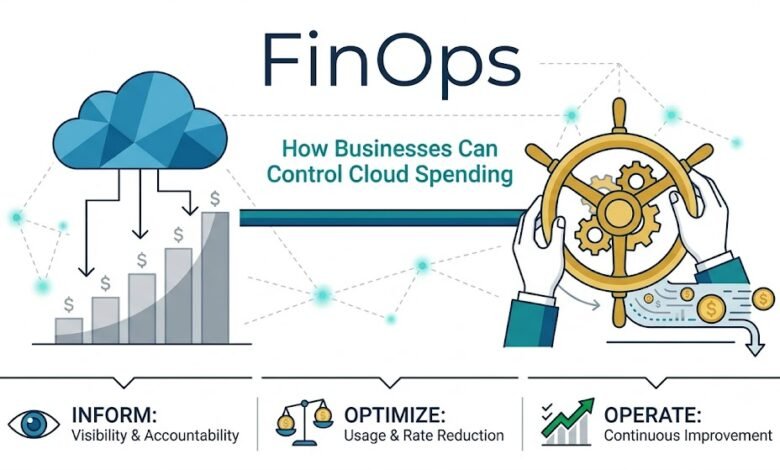
FinOps creates an ongoing process for measuring cloud usage, making informed decisions, and improving financial accountability. Organizations often organize this work around three connected activities.
1. Understand Cloud Spending
The first step is to collect reliable information about cloud expenses. Teams review billing reports, service usage, resource ownership, and spending trends.
They can then group costs by department, project, application, or business unit. This makes it easier to answer questions such as which application costs the most or whether a new project is using more infrastructure than expected.
2. Optimize Cloud Resources
Once the main cost drivers are visible, teams can identify opportunities to improve efficiency. These may include removing unused resources, adjusting server sizes, improving storage policies, or using suitable pricing commitments for predictable workloads.
Optimization should always consider performance, reliability, and security. Reducing spending is not useful if it causes service interruptions or damages the customer experience.
3. Monitor and Improve Continuously
Cloud optimization is not a one-time activity. New applications, changing customer demand, and product updates can all affect costs.
Teams should review spending regularly, establish budgets, configure alerts, and compare actual expenses with forecasts. Over time, this creates a repeatable process for identifying problems before they become expensive.
Practical Ways Businesses Can Reduce Cloud Costs
Organizations do not always need major infrastructure changes to improve cloud spending. A few consistent practices can make a meaningful difference.
Right-Size Cloud Resources
Businesses should compare the capacity of their cloud resources with actual usage. If a virtual machine consistently uses only a small portion of its available capacity, a smaller configuration may be sufficient.
Any adjustment should be tested carefully to ensure that applications continue to perform reliably during busy periods.
Automate Resource Shutdown
Development and testing environments do not always need to operate around the clock. Businesses can schedule non-production resources to shut down outside working hours when appropriate.
Automation reduces dependence on employees remembering to switch off resources manually.
Improve Storage Management
Old backups, duplicate files, unused snapshots, and rarely accessed data can increase storage costs. Companies can establish retention rules and use storage tiers that match how frequently information is accessed.
Important records must still be retained according to operational, legal, and compliance requirements.
Use Budgets and Spending Alerts
Cloud budgets help organizations establish spending expectations for teams and projects. Alerts can notify the responsible people when usage approaches a defined threshold.
These notifications do not automatically prevent every overspend, but they give teams an opportunity to investigate unusual activity early.
Review Pricing Options
Cloud providers offer different pricing arrangements for different workload patterns. Businesses with stable, predictable usage may benefit from commitment-based discounts, while flexible workloads may be better suited to on-demand pricing.
Before making a commitment, organizations should evaluate expected usage, contract conditions, flexibility, and the risk of paying for capacity they no longer need.
The Role of Teams in FinOps
FinOps works best when responsibility is shared rather than assigned entirely to the finance department.
Finance teams analyze budgets, evaluate forecasts, and help communicate the financial impact of cloud usage.
Engineering teams understand application requirements and can identify technical changes that improve resource efficiency.
Operations teams monitor infrastructure, manage capacity, and help maintain service reliability.
Business leaders set priorities and decide how cloud investments should support organizational goals.
When these groups work together, cloud costs become easier to explain and manage. Teams can make decisions using both technical performance data and financial information.
Common FinOps Mistakes to Avoid
Businesses can weaken their cost-management efforts by focusing on savings without considering the wider impact.
- Cutting resources without testing: Reducing capacity too aggressively can slow applications or interrupt services.
- Treating optimization as a one-time project: Cloud usage changes, so cost reviews need to continue.
- Ignoring ownership: Resources without clear owners are harder to monitor and optimize.
- Tracking total spending alone: Overall bills do not always explain the cost of serving individual customers, running applications, or delivering products.
- Using tools without clear goals: Dashboards and alerts are more useful when teams know which metrics matter and who should act on them.
Avoiding these mistakes helps organizations build a more balanced approach to cloud financial management.
How to Measure FinOps Success
A business should measure more than the reduction in its monthly cloud bill. Useful indicators include:
- Cloud spending against budget: Shows whether actual expenses match financial expectations.
- Resource utilization: Helps identify infrastructure that may be oversized or underused.
- Forecast accuracy: Measures how closely predicted cloud expenses match actual spending.
- Cost per customer or transaction: Connects infrastructure expenses with business activity.
- Unit cost trends: Shows whether the cost of delivering a product or service is improving as the business grows.
- Commitment utilization: Helps determine whether reserved or committed cloud capacity is being used effectively.
The right metrics depend on the organization. A startup may prioritize cash flow and predictable budgets, while a large enterprise may need detailed cost allocation across many teams and applications.
What Is the Future of FinOps?
As organizations adopt AI applications, data platforms, containers, and increasingly distributed cloud environments, understanding technology costs is becoming more complicated.
AI workloads, for example, may generate expenses through model inference, accelerator usage, data processing, and supporting infrastructure. Traditional cloud billing reviews may not provide enough detail to explain the cost of individual AI features or business outcomes.
FinOps practices can help teams connect these costs with actual usage and value. Automation and AI-assisted analytics may also help identify unusual spending patterns, forecast demand, and recommend possible optimizations.
However, recommendations still require human judgment. Businesses must balance cost, performance, security, compliance, and long-term growth rather than pursuing the lowest possible bill.
Conclusion
FinOps gives businesses a practical way to manage cloud spending through shared responsibility, better visibility, and continuous improvement. It helps teams understand what they are paying for, identify unnecessary expenses, and connect infrastructure decisions with business priorities.
Successful FinOps is not about cutting every cost. It is about using cloud resources wisely, paying for capacity that serves a purpose, and making spending more predictable as the organization grows.
By combining regular cost reviews, resource optimization, clear ownership, and meaningful performance metrics, businesses can make cloud spending more manageable while continuing to innovate.
Frequently Asked Questions
1. What is FinOps in cloud computing?
FinOps is a financial management practice that helps businesses monitor, understand, and optimize cloud spending through collaboration between finance, engineering, and business teams.
2. How does FinOps help businesses reduce cloud costs?
FinOps helps businesses identify unused resources, right-size computing capacity, monitor budgets, and choose suitable pricing options to reduce unnecessary cloud expenses.
3. Who is responsible for FinOps in an organization?
FinOps is a shared responsibility involving finance teams, cloud engineers, IT operations, and business leaders who work together to manage spending and improve resource efficiency.
4. What are the main benefits of implementing FinOps?
The main benefits include better cost visibility, more accurate budgeting, improved cloud resource utilization, fewer unexpected expenses, and stronger alignment between technology spending and business goals.