Modern businesses rely on websites, cloud platforms, APIs, remote access tools, SaaS applications, employee devices, and connected services to keep operations moving. While these technologies improve efficiency, they also create more opportunities for cyber threats.
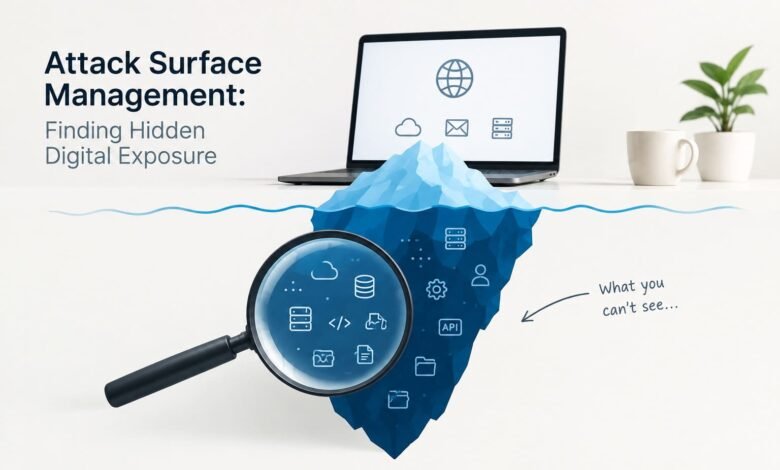
The difficult part is that organizations do not always know exactly what is exposed.
A forgotten subdomain, an outdated server, an unused cloud resource, an exposed API, or a third-party connection can quietly become a security weakness. This is where Attack Surface Management (ASM) becomes important.
Attack Surface Management helps organizations discover, understand, monitor, and reduce the digital assets that could potentially be targeted by attackers. Instead of looking only at known systems, ASM takes a broader view of what an organization presents to the outside world.
What Is Attack Surface Management?
Attack Surface Management is a cybersecurity practice focused on continuously identifying and evaluating an organization’s potential attack points.
An attack surface can include websites, applications, servers, cloud resources, APIs, remote access services, connected devices, domains, and third-party systems. Some of these assets may be well documented, while others may have appeared over time without being properly added to security inventories.
The main idea is simple:
You cannot properly protect digital assets if you do not know they exist.
ASM approaches security from an attacker’s perspective. Instead of asking only, “What systems does our company own?”, security teams also ask, “What could an attacker discover and potentially reach?”
This outside-in view can reveal exposure that traditional asset inventories may miss.
Why Hidden Digital Exposure Is a Problem
Businesses are constantly changing their technology environments.
A company may launch a new website, migrate an application to the cloud, add a SaaS platform, create a temporary development server, acquire another business, or connect a new vendor.
These changes can happen faster than security teams can update their records.
As a result, organizations may end up with:
- Forgotten domains and subdomains
- Unused cloud resources
- Outdated applications
- Exposed administrative interfaces
- Misconfigured storage
- Publicly accessible services
- Unknown APIs
- Shadow IT applications
- Old development environments
- Third-party connections
- Remote access systems
CISA specifically warns that organizations can unknowingly leave vulnerable or misconfigured systems accessible from the internet. Regular exposure assessments can help identify and reduce these risks.
Common Sources of Hidden Attack Surface
1. Forgotten Digital Assets
A company may create a temporary server or website for a campaign, event, product test, or development project.
When the project ends, the infrastructure may remain online.
Nobody may actively use it, but attackers can still discover it.
These forgotten assets are particularly concerning because they may not receive regular updates or security monitoring.
2. Cloud Misconfigurations
Cloud platforms make it easy to deploy applications and services quickly.
However, speed can sometimes lead to configuration mistakes.
Examples include overly broad access permissions, publicly accessible resources, unused accounts, or services that were never properly restricted.
Because cloud environments can change rapidly, security teams need continuous visibility rather than relying only on occasional reviews.
3. Exposed APIs
APIs allow applications and services to communicate with each other. They are now a major part of modern digital infrastructure.
However, an API can become a security concern when it is poorly protected, outdated, unnecessarily exposed, or connected to sensitive information.
Organizations should maintain an accurate inventory of their APIs and understand which ones are publicly accessible and why.
4. Shadow IT
Employees and teams sometimes adopt software without going through formal IT or security processes.
They may use a productivity application, collaboration platform, cloud storage service, or development tool because it solves an immediate business problem.
The security team may not know the service exists.
This creates a visibility gap and makes it harder to assess whether sensitive information is being exposed.
5. Third-Party Connections
Modern businesses rarely operate alone.
They depend on technology providers, contractors, cloud services, marketing platforms, payment systems, and other partners.
A connected third party can introduce additional exposure into an organization’s environment. Security teams therefore need to understand not only their own assets but also important external dependencies.
How Attack Surface Management Works
ASM is not simply about running one security scan.
It is a continuous process that generally involves discovery, assessment, prioritization, remediation, and monitoring.
Step 1: Discover Assets
The first step is finding what exists.
Security teams identify domains, IP addresses, applications, cloud resources, APIs, certificates, remote services, and other externally visible assets.
The goal is to create a more complete picture of the organization’s digital footprint.
Step 2: Understand the Exposure
Finding an asset is only the beginning.
Security teams need to determine how the asset is exposed, what technology it uses, whether it is still required, who owns it, and whether it handles sensitive information.
This context makes the security assessment much more useful.
Step 3: Identify Security Weaknesses
Once assets are known, teams can look for issues such as:
- Outdated software
- Weak authentication
- Misconfigured services
- Exposed management interfaces
- Unnecessary internet access
- Expired certificates
- Unsupported technologies
- Risky configurations
Not every finding carries the same level of risk.
Step 4: Prioritize the Most Important Risks
A long list of security findings can overwhelm a security team.
ASM helps organizations focus on the exposures that could have the greatest business impact.
For example, an internet-facing system containing sensitive customer information may deserve faster attention than a low-risk development asset with no sensitive data.
Risk-based prioritization allows teams to spend their limited time where it matters most.
Step 5: Remediate the Exposure
After identifying a problem, organizations can take appropriate action.
Depending on the situation, this might involve:
- Removing an unnecessary asset
- Restricting internet access
- Applying security patches
- Fixing cloud configurations
- Updating authentication controls
- Replacing unsupported software
- Adding multifactor authentication
- Removing unused accounts
- Working with a third-party provider
CISA recommends removing unnecessary internet exposure and applying protections such as patches, stronger authentication, and controlled access to systems that must remain publicly reachable.
Step 6: Continuously Monitor
The attack surface does not remain static.
New systems appear, old systems disappear, configurations change, and organizations adopt new technologies.
That is why ASM needs continuous monitoring.
A security team might have a clean environment today but discover new exposure tomorrow after a new application or cloud service goes live.
Attack Surface Management vs. Vulnerability Management
ASM and vulnerability management are closely related, but they are not exactly the same.
Vulnerability management generally focuses on finding and managing known security weaknesses within identified systems.
Attack Surface Management focuses more broadly on discovering what assets and exposure points exist in the first place and understanding them from an attacker’s perspective.
For example, vulnerability management may identify that a known server has an outdated component.
ASM may first reveal that the server exists, is internet-facing, belongs to an unexpected business unit, and was missing from the organization’s current asset inventory.
Both practices can complement each other.
The Role of Automation in ASM
Modern digital environments can contain thousands of assets.
Manually checking every domain, cloud resource, API, and connected service is difficult and time-consuming.
Automation can help security teams continuously discover assets, detect changes, collect security information, and prioritize important findings.
However, automation should support security professionals rather than replace human decision-making.
A security team still needs to understand business requirements and determine whether an exposure is necessary, acceptable, or should be removed.
Why ASM Matters for Growing Businesses
Large enterprises are not the only organizations that need attack surface visibility.
Small and growing businesses can also accumulate digital exposure quickly.
A company might begin with a website and a few cloud applications. Over time, it may add remote workers, customer portals, SaaS platforms, APIs, mobile applications, development environments, and third-party integrations.
The technology footprint grows even when nobody intentionally creates a larger security perimeter.
ASM helps organizations keep track of this changing environment and identify exposure before it becomes a larger security problem.
Best Practices for Reducing Digital Exposure
Organizations can strengthen their approach to attack surface management by following several practical principles.
Maintain an Accurate Asset Inventory
Know which domains, applications, servers, cloud resources, APIs, and services belong to the organization.
Remove What Is No Longer Needed
Unused systems do not provide business value but can continue creating security risk.
If an asset is unnecessary, consider decommissioning it.
Limit Internet Exposure
Not every system needs to be publicly accessible.
Restrict access to systems that do not require direct internet connectivity.
Patch Important Systems
Keep externally accessible software and infrastructure updated and replace technologies that no longer receive security support.
Strengthen Authentication
Use strong authentication controls and multifactor authentication where appropriate, particularly for administrative and remote access systems.
Monitor Continuously
Schedule regular assessments and use continuous monitoring where possible.
CISA recommends routine assessments because internet-accessible assets can change as an organization’s technology environment evolves.
Connect Security and IT Teams
ASM works best when security teams, IT teams, developers, cloud administrators, and business owners share visibility.
When a security finding has a clear owner, remediation becomes easier and faster.
The Future of Attack Surface Management
Technology environments are becoming increasingly distributed.
Cloud computing, SaaS applications, APIs, remote work, connected devices, AI systems, and third-party services continue to expand the number of digital components organizations need to understand.
This makes visibility increasingly important.
Future security programs will likely place greater emphasis on continuous asset discovery, automated risk prioritization, exposure reduction, and integration with security operations.
The goal is not to eliminate every possible attack surface. That would be unrealistic for most modern organizations.
The goal is to understand the attack surface, reduce unnecessary exposure, and respond quickly when new risks appear.
Conclusion
Attack Surface Management provides organizations with a practical way to understand the digital footprint that attackers may see.
The biggest security weakness is sometimes not a sophisticated vulnerability. It may simply be an asset that nobody knew was exposed.
A forgotten server, unused application, misconfigured cloud resource, exposed API, or unmanaged third-party connection can create unnecessary risk.
By continuously discovering assets, assessing exposure, prioritizing risks, fixing weaknesses, and monitoring changes, organizations can build a stronger and more proactive cybersecurity strategy.
In a constantly changing digital environment, knowing what is exposed is one of the first steps toward knowing what needs to be protected.
Frequently Asked Questions
1. What is Attack Surface Management?
Attack Surface Management (ASM) is a cybersecurity practice used to discover, monitor, and reduce an organization’s exposed digital assets. It helps security teams identify domains, servers, APIs, cloud resources, applications, and other systems that attackers could potentially target.
2. Why is Attack Surface Management important?
Attack Surface Management is important because organizations often have digital assets that are forgotten, misconfigured, outdated, or unknown to security teams. Finding these hidden exposures helps businesses reduce unnecessary risks before attackers can take advantage of them.
3. What can Attack Surface Management discover?
ASM can help identify internet-facing domains, subdomains, servers, cloud resources, APIs, applications, remote access services, and other publicly accessible assets. It can also help organizations understand changes in their external digital environment.
4. How does Attack Surface Management reduce cybersecurity risks?
ASM reduces cybersecurity risks by giving organizations better visibility into their exposed assets. Security teams can prioritize important weaknesses, remove unnecessary systems, fix misconfigurations, strengthen access controls, and continuously monitor for newly exposed assets.