AI is changing the way businesses build and manage websites. But adding AI to your website doesn’t mean you need to turn every page into a high-tech experiment.
The real value comes from using AI where it can make things easier for your visitors and your team.
Think about the last time you visited a website and couldn’t find the information you needed. Maybe the search function didn’t understand what you were looking for, the chatbot gave you generic answers, or you had to fill out a long form just to ask a simple question.
These are exactly the kinds of problems AI can help solve.
From personalized recommendations and smarter search to automated customer support and better lead generation, AI integration for websites can create a faster and more useful online experience.
Let’s look at some practical ways businesses can make it work.
What Does AI Integration Mean for a Website?
Simply put, AI integration means adding artificial intelligence to different parts of your website to make them smarter or more efficient.
That could mean using AI to answer customer questions, recommend content, analyze visitor behavior, improve website search, or automate repetitive marketing tasks.
Some common examples include:
- AI chatbots and virtual assistants
- Personalized content recommendations
- AI-powered website search
- Automated lead qualification
- Content and SEO assistance
- Customer behavior analysis
- Product recommendations
- Marketing automation
You don’t have to implement everything at once. In fact, starting with one clear problem is often the better approach.
1. Start With a Real Problem
One of the biggest mistakes businesses make is adding AI simply because it is popular.
Before choosing an AI tool, take a close look at your website.
Where are visitors struggling?
Maybe customers repeatedly ask the same questions. Perhaps your sales team spends hours sorting through website leads. Or maybe visitors can’t easily find the right blog posts or products.
These are much better reasons to introduce AI.
For example, if your support team answers the same 10 questions every day, an AI assistant could handle those basic questions and allow your team to focus on more complicated customer issues.
Start with the problem, not the technology.
2. Give Visitors a More Personalized Experience
Every visitor who lands on your website is looking for something slightly different.
A first-time visitor might want to understand what your company does, while an existing customer may be looking for technical support or a specific product.
AI can help websites recognize these different needs and provide more relevant recommendations.
For example, a visitor reading several articles about cybersecurity could be shown related guides, tools, or service pages instead of completely unrelated content.
When done properly, personalization doesn’t feel like technology. It simply feels like the website understands what the visitor needs.
3. Make Your Chatbot Actually Useful
We’ve all experienced chatbots that respond with something like, “I’m sorry, I didn’t understand that.”
That’s not the kind of AI experience businesses should aim for.
A useful AI assistant should understand common questions and provide clear, direct answers.
It can help visitors:
- Find products or services
- Answer common questions
- Locate resources
- Understand basic features
- Navigate your website
- Start a sales inquiry
But there should always be an easy way to reach a real person when necessary.
AI should make customer support easier—not make customers feel trapped inside an automated system.
4. Upgrade Your Website Search
Website search is often overlooked, but it can have a major impact on user experience.
Traditional search may only look for exact words. AI-powered search can go a step further by understanding what someone actually means.
For example, a visitor might type:
“How do I protect company information stored online?”
An AI-powered search system could understand that the person is probably looking for information about cloud security, data protection, or cybersecurity.
This becomes especially useful for websites with a large library of articles, products, documentation, or resources.
5. Let AI Help With Your Content
Content teams have plenty of repetitive work.
Researching topics, organizing ideas, finding content gaps, reviewing old articles, and identifying related topics can take hours.
AI can make much of this work faster.
For example, it can help you:
- Find related topics
- Organize content ideas
- Identify frequently asked questions
- Discover content gaps
- Suggest internal linking opportunities
- Review older content
- Create initial content outlines
But there is an important difference between using AI to assist writers and letting AI write everything without review.
Human experience, opinions, examples, and editing are what make content genuinely useful.
Use AI to speed up the process, not to remove the human element.
6. Use AI to Support Your SEO Strategy
SEO has become more complex, especially as search engines become better at understanding context and intent.
AI can help SEO teams process large amounts of information and identify useful patterns.
For example, you can use AI to assist with:
- Keyword grouping
- Search-intent analysis
- Topic research
- Content audits
- Internal-link suggestions
- SEO content briefs
- Competitor research
- Meta title and description ideas
However, AI isn’t a replacement for good SEO.
You still need useful content, strong website architecture, technical SEO, good page experience, relevant keywords, and content that actually answers the user’s question.
7. Turn Website Visitors Into Better Leads
Getting website traffic is great, but traffic alone doesn’t grow a business.
The bigger question is: How many of those visitors become meaningful leads?
AI can help businesses qualify leads before they reach the sales team.
For example, an AI assistant could ask a visitor what type of service they’re interested in, what their business needs are, and when they are looking to get started.
Based on those answers, the visitor can be directed to the right service page or sales representative.
This can save your sales team time and help them focus on prospects who are more likely to convert.
8. Connect AI With Your Existing Tools
AI works even better when it isn’t operating by itself.
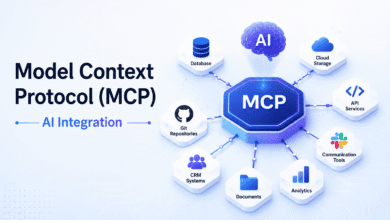
Businesses can connect AI-powered website features with tools such as:
- CRM platforms
- Analytics systems
- Marketing automation platforms
- Customer support software
- Content management systems
- E-commerce platforms
Imagine a visitor downloads three resources about the same service and then contacts your sales team.
If your systems are connected properly, the sales representative may already have useful context about what the visitor is interested in.
That makes the conversation more relevant from the beginning.
9. Don’t Let AI Slow Down Your Website
Adding more technology doesn’t automatically mean creating a better website.
Poorly implemented AI tools can increase page load times, add unnecessary scripts, or create delays when visitors interact with them.
Before launching an AI feature, test how it affects:
- Page speed
- Mobile performance
- Core Web Vitals
- Accessibility
- API response times
- Overall user experience
A website that loads quickly and works smoothly will always be more valuable than one packed with impressive features that frustrate users.
10. Take Privacy Seriously
AI often depends on data, and that makes privacy an important part of implementation.
Before connecting an AI system to your website, understand what information it collects and how that information is handled.
Ask questions such as:
- What data does the AI system receive?
- Where is the information stored?
- Who can access it?
- Is the data shared with another provider?
- How long is it retained?
- Do users understand how their information is being used?
Don’t collect information simply because you can.
A responsible AI strategy collects the information you actually need and handles it carefully.
11. Keep Humans Involved
AI can be extremely useful, but it isn’t perfect.
It can misunderstand questions, provide incorrect information, or miss important context.
That’s why human oversight is still important.
For example, customer complaints, sensitive issues, complicated sales questions, and business-critical decisions may require a human response.
The best approach is often a combination of both:
AI handles speed and repetitive work. Humans handle judgment, empathy, and complex situations.
12. Measure What Actually Matters
Don’t judge an AI feature by how impressive it looks.
Judge it by whether it improves your website or business.
Depending on your goals, you might track:
- Conversion rates
- Lead quality
- Customer engagement
- Support resolution rates
- Website search success
- Time spent on important pages
- Sales-qualified leads
- Customer satisfaction
For example, if you add an AI chatbot but your conversion rate doesn’t improve and customers frequently ask to speak with a human, that’s useful information.
Maybe the chatbot needs better training—or perhaps it isn’t the right solution for that part of your website.
Common AI Integration Mistakes
AI can create excellent results, but only when it is implemented thoughtfully.
Here are a few mistakes worth avoiding.
Using AI Just for the Sake of AI
Not every website needs an AI chatbot or recommendation engine. If a simple solution works better, use it.
Publishing AI Content Without Editing
AI-generated content can contain inaccurate information, repetitive language, or generic explanations. Human review is essential.
Ignoring the User Experience
Don’t allow AI pop-ups, chat windows, or recommendations to become annoying distractions.
Forgetting Mobile Visitors
Your AI features should work just as well on smartphones as they do on desktop computers.
Collecting Too Much Data
More data isn’t always better. Collect what you need and make your data practices clear.
What Does the Future of AI-Powered Websites Look Like?
Websites are gradually moving from static pages toward more interactive and intelligent experiences.
Instead of simply showing visitors information, future websites will increasingly help people find exactly what they need.
A visitor might ask a question in natural language, receive a personalized recommendation, compare options, get an answer from an AI assistant, and complete an action—all within the same website experience.
But the technology itself isn’t the main point.
The real goal is to make websites more useful, more relevant, and easier to navigate.
Final Thoughts
AI integration can give your website a serious boost, but successful implementation isn’t about adding every AI feature available.
Start with a genuine problem. Choose a practical solution. Test it with real users. Measure the results. Then improve it based on what you learn.
Whether you’re looking to improve customer support, generate better leads, personalize content, strengthen SEO, or automate repetitive tasks, AI can become a valuable part of your website strategy.
The secret isn’t simply using AI.
It’s using AI where it genuinely makes the experience better for both your visitors and your business.
Frequently Asked Questions
How can AI integration improve a website?
AI can improve a website by personalizing content, answering customer questions, improving search, qualifying leads, automating repetitive tasks, and making the overall user experience more helpful and efficient.
Is AI integration useful for small businesses?
Yes. Small businesses can use AI for customer support, lead generation, content assistance, appointment handling, and website personalization without needing to build a complex AI system from scratch.
Can AI integration improve website SEO?
AI can support SEO by helping with keyword research, search-intent analysis, content optimization, internal-link suggestions, content audits, and identifying relevant content opportunities. However, human expertise and high-quality content are still essential.
How do I start integrating AI into my website?
Start by identifying one specific problem, such as repetitive customer questions or poor website search. Choose an AI solution that addresses that problem, test it, monitor the results, and expand its use as you see measurable benefits.