How Your Smartphone Can Reveal Your Daily Habits Without You Realizing It

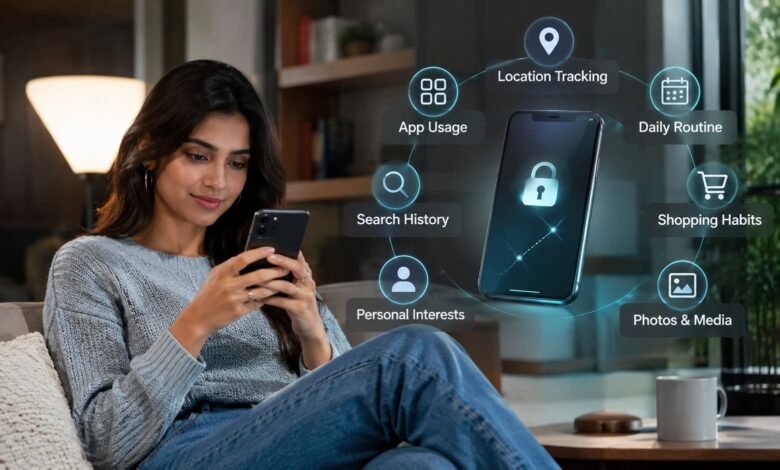
For many people, a smartphone is the first thing they reach for in the morning and the last thing they check before going to sleep. It helps us communicate with friends, manage work, find directions, shop online, watch videos, and stay connected with the world.
Over time, smartphones have become more than communication devices. They have turned into personal assistants that understand our preferences, remember our activities, and make suggestions based on the way we use them.
But have you ever wondered how much information your smartphone may collect during an ordinary day?
A quick search for a restaurant, a visit to a shopping centre, a few minutes spent scrolling through social media, or a photograph taken during a holiday may seem like separate activities. Yet, depending on the apps and services involved, these actions can create information about your interests, routines, and preferences.
The surprising part is that you do not need to share your personal details directly for some of these patterns to become visible. Your everyday digital activities may provide enough information to build a picture of your behaviour.
This does not mean that every smartphone application is secretly monitoring everything you do. Many apps collect information for legitimate purposes, such as providing directions, improving services, or remembering your preferences. However, the amount and type of information collected can vary considerably.
Understanding how smartphone data works is becoming an important part of protecting personal privacy.
1. Your Location Can Reveal Your Everyday Routine
Location information is one of the most useful features of a smartphone. It helps us navigate unfamiliar places, find nearby services, check traffic conditions, and share our location with trusted contacts.
However, location data can also reveal patterns that are not immediately obvious.
Imagine that you leave home at approximately the same time every morning, travel to the same office, visit a nearby café during lunch, and return home in the evening.
These activities are normal parts of your daily routine. But repeated location information may help identify the places you visit regularly and the times when you are usually there.
Smartphones can estimate location using several technologies, including GPS, nearby Wi-Fi networks, Bluetooth signals, and mobile network information. The accuracy depends on the device, environment, and services being used.
Some applications need precise location information to function properly. A navigation app, for example, needs to understand where you are to provide accurate directions.
Other applications may only need an approximate location to show local weather or nearby businesses.
The important difference is that location access should match the purpose of the application.
When location information is collected repeatedly and retained over time, it may reveal regular travel patterns, frequently visited places, and changes in routine.
This is why reviewing location permissions is an important step toward better smartphone privacy.
2. Your App Usage Can Reveal Your Daily Schedule
Think about the applications you open throughout the day.
You may check a messaging app after waking up, read the news during breakfast, use a work application during office hours, and watch videos before going to bed.
These activities create a digital routine that may be different from the routine you follow in the physical world.
Some applications collect information about how frequently users open them, which features they use, and how they interact with different sections.
This information can help developers understand whether an application is useful, identify technical problems, and improve the user experience.
However, app usage information can also reveal personal interests and habits.
For example, regularly using a fitness application may indicate an interest in exercise. Frequently opening a travel application may suggest that someone enjoys planning trips. Repeatedly using educational applications may reflect an interest in learning new skills.
These patterns do not necessarily reveal someone’s exact intentions. A person may use an application for many different reasons.
Still, when app activity is combined with other information, it can provide a more detailed understanding of a person’s digital behaviour.
Our smartphones may know which applications we use most often, even when we rarely think about our own usage patterns.
3. Search History Can Reflect Personal Interests and Concerns
People often use smartphones to search for information they may not discuss openly with others.
Someone may search for a new career opportunity, research a health-related question, compare financial products, or look for advice about a personal situation.
Search engines help people find information quickly, but search activity can also create a record of their interests.
For example, a person researching professional courses may be considering a career change. Someone searching for holiday destinations may be planning a future trip. A person comparing home appliances may be preparing to make a purchase.
Search history can sometimes reveal what people are interested in before they take any action.
Depending on the service and privacy settings, search-related information may be stored in an account or used to personalize results and advertisements.
This is one reason why search history should be treated as personal information.
It is also important to understand that search history is not always shared in the same way across different platforms. The information collected, stored, and used depends on the service provider and its privacy practices.
Reviewing account activity and adjusting search privacy settings can help users maintain better control over their information.
4. Personalized Advertisements May Reflect Your Digital Behaviour
Have you ever searched for a product online and noticed advertisements for similar products later?
For example, you may spend a few minutes researching a laptop and then see advertisements for laptops, accessories, or computer-related products while browsing other websites.
This can happen because advertising systems use different types of information to personalize advertisements.
Depending on the platform, these signals may include browsing activity, search interests, app interactions, advertising identifiers, or information associated with an online account.
The purpose of personalized advertising is often to show products or services that may be relevant to a particular user.
However, the experience can sometimes feel uncomfortable when advertisements appear to follow your interests across different websites.
It is important to remember that personalized advertisements do not automatically mean your smartphone is listening to every conversation.
Many advertising systems can use browsing and app activity without needing access to a microphone.
For example, searching for a particular product or visiting a shopping website may provide enough information for advertising systems to display related advertisements.
Understanding how personalized advertising works can help people make better decisions about their privacy settings.
5. Your Photographs May Contain Hidden Personal Information
Smartphones have made photography an everyday activity.
People take photographs of family gatherings, holidays, food, important documents, and ordinary moments they want to remember.
But a photograph may contain more information than what appears on the screen.
Many digital photographs can include metadata, which is information stored alongside the image.
Depending on the device and camera settings, this metadata may contain:
- The date and time the photograph was taken
- The camera or smartphone model
- Image dimensions and technical details
- Location information, if location tagging is enabled
Location information can be particularly sensitive.
Imagine sharing a photograph taken outside your home, workplace, or another frequently visited location.
If the image contains precise location metadata and the information remains accessible, it could reveal where the photograph was captured.
This does not mean every social media platform displays all photo metadata publicly. Different platforms may remove, retain, or process metadata differently.
Still, checking photo location settings before sharing images is a sensible privacy habit.
A photograph should preserve a memory without unnecessarily exposing personal information.
6. Your Smartphone Can Learn Your Preferences Over Time
Many smartphone features are designed to make everyday activities more convenient.
Your keyboard may suggest words while you type. A music application may recommend songs based on your listening history. A shopping application may display products related to your previous searches.
These features work by using different forms of personalization.
Some information may be processed directly on the smartphone, while other services may use information stored or processed through online systems.
The exact process depends on the application and the feature being used.
Over time, personalization may reflect your preferred language, frequently used applications, interests, and common activities.
For example, a music service may recognize that you frequently listen to a particular type of music and recommend similar songs.
A shopping application may remember products you viewed and make it easier to find them again.
These features can be helpful because they reduce the time needed to complete everyday tasks.
However, personalization also raises an important question: how much information should an application use to understand your preferences?
Convenience is valuable, but users should still have the ability to review and control the information used for personalization.
7. Free Applications Can Have Hidden Privacy Considerations
Many people download free applications without carefully reviewing their permissions or privacy information.
A free application may generate revenue through advertisements, subscriptions, premium features, or other business models.
Some applications may also collect information for analytics, service improvement, or advertising purposes.
The information collected can differ significantly between applications.
A navigation application may reasonably need location access. A messaging application may need access to contacts if you choose to find people using your address book.
However, a simple calculator or flashlight application generally has little reason to request access to sensitive information such as contacts or precise location.
When an application requests permissions that appear unrelated to its main purpose, it is worth taking a moment to understand why.
Users should also consider the reputation of the developer, the application’s privacy policy, and whether the app receives regular updates.
Installing fewer unnecessary applications can reduce the number of services that have access to personal information.
A free application may still be useful and trustworthy, but its privacy practices should not be ignored simply because it costs nothing to download.
8. Connected Devices Can Expand the Amount of Information Collected
Smartphones often work together with other devices.
Smartwatches, fitness bands, wireless headphones, smart home equipment, and connected vehicles may communicate with smartphones through Bluetooth or other technologies.
These connections make everyday activities easier.
For example, a smartwatch may record exercise information, while a smartphone application displays the results. A smart home application may allow users to control lights or check connected devices remotely.
However, connected devices can create additional information about personal activities.
A fitness tracker may record steps, exercise sessions, or sleep-related measurements, depending on its features and permissions.
A smart home application may provide information about connected devices and their usage.
The amount of information collected depends on the device, application, and settings.
When several connected services are used together, they may create a broader picture of a person’s lifestyle.
This is why privacy settings should be reviewed not only on the smartphone itself but also on connected applications and wearable devices.
9. Public Wi-Fi Can Create Additional Privacy Risks
Public Wi-Fi is convenient when travelling, working from a café, or waiting at an airport.
It allows people to access the internet without using their mobile data.
However, not every public Wi-Fi network provides the same level of security.
An unsecured or poorly configured network may expose users to certain risks, particularly when websites or applications do not use proper encryption.
Some attackers may also create fake Wi-Fi hotspots that imitate legitimate networks.
For example, someone may set up a network with a name similar to that of a nearby café. A user who connects without checking the network may unknowingly expose some of their online activity.
Modern websites and applications commonly use encryption to protect information in transit, which reduces many risks. Nevertheless, users should remain careful when connecting to unfamiliar networks.
Avoid accessing sensitive accounts through suspicious networks, keep your smartphone updated, and use trusted applications and websites.
Public Wi-Fi should be treated as a convenience, not as a guarantee of privacy.
10. Small Pieces of Information Can Create a Bigger Picture
One piece of information rarely tells the complete story about a person.
Knowing someone’s approximate location does not explain why they are there. Knowing which application they use does not reveal everything they do inside it.
However, different pieces of information may become more meaningful when combined.
Consider a simple example.
A location record may show that someone visits a particular shopping area every weekend.
Search activity may indicate an interest in a specific product.
App usage may show that the person frequently compares prices.
Together, these details could suggest a shopping routine or purchasing interest.
Another example could involve someone who regularly uses travel applications, searches for destinations, and visits travel-related websites.
These activities may indicate an interest in planning a holiday.
This process of connecting different information points is one reason digital data can be valuable.
The concern is not that every company is misusing information. Rather, it is that information collected for different purposes may sometimes reveal more when considered together.
Understanding this possibility helps people make more thoughtful decisions about what they share online.
11. How to Protect Your Smartphone Privacy
Protecting smartphone privacy does not require giving up technology or avoiding useful applications.
Instead, it involves making informed decisions about permissions, accounts, and digital habits.
Review App Permissions Regularly
Check which applications have access to your location, camera, microphone, contacts, photos, and other sensitive information.
If an application no longer needs a particular permission, consider removing it.
Both Android and iPhone provide settings that allow users to review app permissions.
Limit Location Access
Allow location access only when it is necessary for an application’s main purpose.
For example, a navigation application may need precise location while providing directions.
A weather application may only need an approximate location.
Where available, choose options such as “While Using the App” instead of allowing continuous background access.
Remove Applications You No Longer Use
Unused applications can remain connected to accounts or retain previously granted permissions.
Removing applications that are no longer useful can help reduce unnecessary access to personal information.
Before deleting an application, consider whether you need to back up any important information stored inside it.
Check Your Advertising Preferences
Review the advertising and personalization settings available in your smartphone and online accounts.
Some platforms allow users to limit personalized advertisements or reset advertising identifiers.
These settings may not stop all advertising, but they can help reduce certain forms of personalization.
Keep Your Smartphone Updated
Operating system and application updates often include security improvements and bug fixes.
Installing updates regularly helps protect your device against known security problems.
Enable automatic updates where appropriate, and avoid installing applications from unknown sources unless you understand the risks.
Use Strong Passwords and Two-Factor Authentication
Protect your smartphone accounts with strong, unique passwords.
Where available, enable two-factor authentication to add another layer of account security.
This is especially important for email, cloud storage, social media, and financial accounts.
Be Careful About Sharing Personal Photographs
Before posting photographs publicly, consider whether they reveal sensitive locations, documents, or personal details.
Review camera settings to understand whether location information is being attached to photographs.
Avoid sharing images that expose information you would prefer to keep private.
Review Connected Devices
If you use a smartwatch, fitness tracker, or smart home application, review its permissions and privacy settings.
Check what information is collected and whether you can disable features you do not need.
12. Why Smartphone Privacy Matters More Today
Smartphones are becoming increasingly connected to our personal and professional lives.
We use them to communicate with colleagues, manage finances, store photographs, access cloud services, and control connected devices.
This means that smartphones may contain or provide access to a wide range of personal information.
As digital services become more personalized, understanding how information is collected and used becomes increasingly important.
Privacy is not only about hiding personal information.
It is also about having control over who can access your information, how it is used, and whether it is shared beyond the purpose you originally expected.
People should be able to enjoy the benefits of modern technology without feeling that they must give up every detail of their daily lives.
Developers and service providers also have an important role to play by explaining their data practices clearly and providing meaningful privacy controls.
A better digital experience should combine convenience, transparency, and responsible data handling.
Conclusion
Our smartphones have become an essential part of modern life.
They help us communicate, work, learn, travel, and manage everyday activities. At the same time, the information generated through our digital routines can reveal more about us than we may realize.
Location records, app usage, search history, photographs, connected devices, and personal preferences can all contribute to a broader understanding of our behaviour.
This does not mean smartphones are dangerous or that every application collects information improperly.
It simply means that digital privacy deserves more attention than it often receives.
The best approach is to use technology thoughtfully.
Review your permissions, choose applications carefully, keep your device updated, and understand what information you are comfortable sharing.
A smartphone should make your life easier without making you feel that you have lost control of your personal information.
Frequently Asked Questions
1. Can my smartphone track my daily habits?
Yes, depending on the apps you use and the permissions you allow. Location data, app activity, browsing history, and other digital information may help reveal your daily routines and preferences.
2. How does my smartphone know my location?
Smartphones can estimate your location using GPS, Wi-Fi networks, Bluetooth signals, and mobile networks. Apps may use this information to provide navigation, local services, and other location-based features.
3. How can I stop apps from collecting unnecessary personal data?
Review app permissions regularly, limit location access, remove applications you no longer use, and check your privacy settings. Only allow apps to access information they genuinely need to perform their main functions.
4. Can smartphone advertisements be based on my online activity?
Yes. Some advertising systems use browsing activity, search interests, app interactions, and other signals to personalize advertisements. You can review your advertising and privacy settings to manage certain types of personalization.